
Shark Detect Pro
Floor-state sensing pushes Shark's vacuum closer to active floor monitoring than static zoning. Coverage remains conditional on mapped space; the sensor suite amplifies what LiDAR already maps.
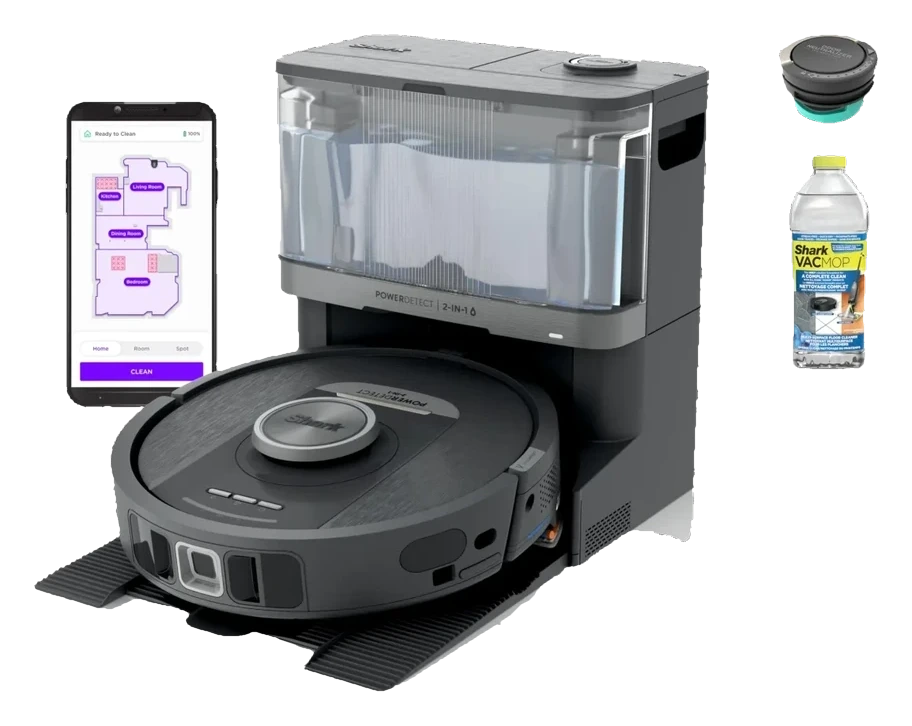
Will the Shark Detect Pro work in your home?
Describe your home using the controls. Each choice reads the spec sheet for you, flagging where the Shark Detect Pro is built for your space and where it isn’t.
A classification of fit for the conditions you set, not a recommendation. Verdicts describe engineering design intent, not test results.
The full spec sheet.
Priced near the category median, with every figure charted against the category below.
- Footprint
- 13.8 in dia · 3.6 in tall
- Weight
- 6.6 lbs
- Battery
- 72 Wh · Li-ion
- Wi-Fi
- 2.4 GHz only
- Voice
- Alexa, Google Home
- Onboard dustbin
- 300 mL✓
- Dock type
- Auto-empty (bagless)
360° LiDAR with NeverStuck obstacle handling and Detect floor-state sensing; no camera
Position shows where the figure sits across the tracked category, not a quality judgment. Suction in Pascals has no standard test method, and the published figure is a peak-mode claim, so it is comparable only within a brand and generation.
Living with it.
LiDAR navigation is mature; dock integration is the reliability bottleneck. Firmware cycles have addressed mapping drift; consumable-gate issues persist.
Established owner base since Q4 2023 reports consistent LiDAR performance and general mapping stability. Dock clogging and consumable-reorder friction noted in owner forums; no major recall documented. Firmware updates address occasional RTK false-positives in multi-level homes.
$799 to buy, then about $160 a year for the replaceable parts below. Over three years that is roughly $480 past the sticker price. Excludes electricity and any repairs.
- FilterAs needed
Replacement cadence from the maintenance schedule; prices shown where the source documents them.
CautionDock electrical safety: Self-empty dock plugged into mains continuously; ensure outlet is properly grounded and inaccessible to pets/children during auto-empty cycles.
NoteCloud account data collection: Shark account required for app use and autonomous scheduling; location, cleaning history, and device telemetry transmitted to manufacturer servers per privacy policy.
How the assessment has moved.
Every announcement, release and reassessment behind the current classification.
-
Sep 2026 · AssessmentRobovations Score recorded at 76 of 100
-
Aug 2026 · AssessmentRecord status: Verified → Provisional
-
Aug 2026 · AssessmentReadiness reassessed: Ready Now → Under Assessment
-
Aug 2026 · AssessmentRobovations Score withheld: too little independent evidence
-
Aug 2026 · AssessmentRobovations Score revised 72 → 60
-
Aug 2026 · AssessmentRobovations Score rescored under v4.2: 67 → 72
-
Jul 2026 · AssessmentMaintenance 70 → 52, Reliability 72 → 79, 3 other dimensions · overall held at 67
-
Jul 2026 · AssessmentRobovations Score recorded at 67 of 100
-
Jun 2024 · NewsRetail price drops as Shark vacuum line expands in 2024
-
Nov 2023 · ReleaseLaunches commercially with self-empty dock option
What people actually ask.
OperationDoes the Shark Detect Pro require a subscription after purchase?
CompatibilityCan I use the Shark Detect Pro without downloading the app?
OperationHow does floor-state sensing change cleaning?
OperationHow long does the self-empty dock battery last?
CompatibilityDoes the Shark Detect Pro work with Alexa or Google Home for voice commands?
OperationHow effective is edge detection on hardwood floors with visible seams?
 III
III
Dreame L10 Pro
 III
III
Ecovacs Deebot T30 Pro Omni
 III
III
Roborock S8 MaxV Ultra
Where it's sold
We may earn commission from qualifying purchases. This does not influence classification.
We are no longer finding a current new-stock listing for this robot. Remaining offers may be used, refurbished, or third-party — confirm the condition and price on the retailer’s page before buying.
Some sellers strike through a “was” price of $1,000, above the $799 manufacturer list — a discount measured off that is not a real saving.
Reference the Shark Detect Pro classification.
Embed the Autonomy Ladder™ mark or copy the citation. The mark is served from this record, so a reassessment updates it on your page automatically.
Get the embed code and citation
Scale proportionally only, up to 2× (536px wide)(224px wide). No recolouring, cropping, rotating, or re-typesetting.
Robovations. "Shark Detect Pro: Autonomy Level III (Conditional Autonomy)." Autonomy Ladder™, assessed August 2026. https://robovations.com/robots/shark-detect-pro/
- Link it. The mark must point at this record. An unlinked mark is not authorised.
- Hot-link it. Never download, self-host, or re-upload the image. A saved copy stops updating, and a mark that has stopped updating is a claim we no longer stand behind.
- A classification, not an endorsement. It may not appear beside language implying Robovations recommends, rates, or approves the product.