
Ecovacs Deebot N20 Pro+
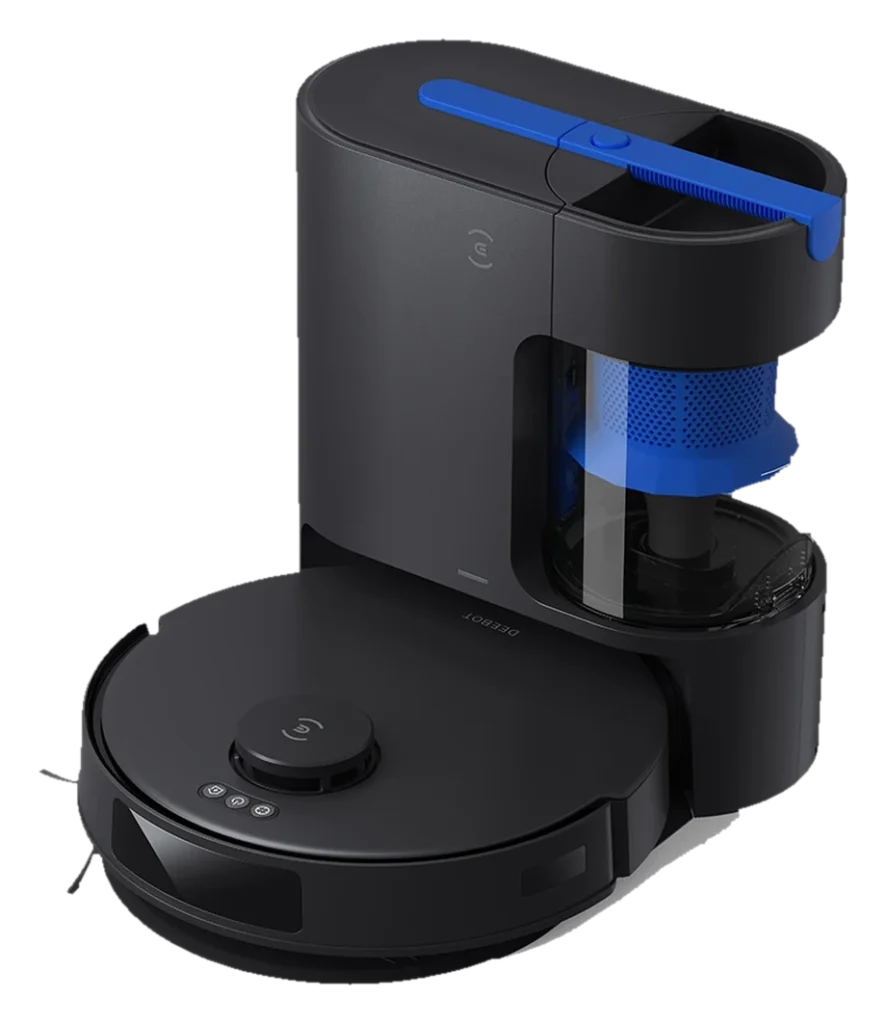
TrueMapping LiDAR, roughly 190 minutes of standard-mode runtime, and Ecovacs' first bagless auto-empty station in a single $599 unit that also mops. The mop pad is a vibrating flat plate with no dock wash: an honest tier boundary owners should weigh before purchase.
Will the Ecovacs Deebot N20 Pro+ work in your home?
Describe your home using the controls. Each choice reads the spec sheet for you, flagging where the Ecovacs Deebot N20 Pro+ is built for your space and where it isn’t.
A classification of fit for the conditions you set, not a recommendation. Verdicts describe engineering design intent, not test results.
Living with it.
Stable in routine operation; dock-return misses and mop-pad maintenance are the documented friction points.
Unprovenowner-reported arc
Owner reports from 2024-2025 describe consistent mapping performance after initial calibration runs. Dock-return failures account for the largest share of reported incidents, typically resolved by repositioning the dock away from reflective surfaces. Mop pad accumulates residue requiring periodic hand-washing.
Confirm dock-return success in app; clear any obstacle alerts.
Hand-wash OZMO Pro 2.0 after mopping sessions; air-dry before reattaching.
Inspect for hair wrap; remove tangles with the included tool.
Check ZeroTangle main for embedded debris; wipe LiDAR lens with a dry cloth.
Empty the bagless canister in the auto-empty station; Ecovacs rates it at 45 days of capacity and high debris volume shortens that.
Replace or wash the primary per manufacturer guidance.
Inspect for wear; replacement run approximately $8-12 for a pair.
$599 to buy, then about $31 a year for the replaceable parts below. Over three years that is roughly $93 past the sticker price. Excludes electricity and any repairs.
- Typical for robot vacuums: every 3-6 monthsWhere to buy Filter
- Typical for robot vacuums: annuallyWhere to buy Brush
Replacement cadence from the maintenance schedule; prices shown where the source documents them. Part links may earn a commission and do not influence the classification. All parts at Ecovacs
-
Auto-empty dock air dischargeDock expels air during emptying; place away from areas where fine dust dispersal is a concern
-
CautionStair edge detectionCliff sensors stop the robot at drop edges; verify sensor lenses are clear before scheduled overnight runs near open staircases
The full spec sheet.
Priced below the category median, with every figure charted against the category below.
- FootprintThe width, depth and height of the robot itself, without its dock.
- 13.9 in dia · 3.8 in tall•
- BatteryStored energy in watt-hours; a larger pack runs longer, not harder.
- 74 Wh · Li-ion
- Wi-FiThe bands the robot can join; many models need a 2.4 GHz network to set up.
- Supported
- VoiceThe assistants the maker's app links to; the robot itself does not listen.
- Alexa, Google Home
- Onboard dustbinThe bin inside the robot; an auto-empty dock moves its contents into a bag.
- 400 mL•
- Water tankThe clean-water tank that feeds the mop, on the robot or in the dock.
- 180 mL•
- Threshold climbThe tallest lip the robot is rated to cross; a door sill is about 0.8 in.
- 0.8 in•
TrueMapping LiDAR (dToF); bump and IR sensors for obstacle contact
Position shows where the figure sits across the tracked category, not a quality judgment. Suction in Pascals has no standard test method, and the published figure is a peak-mode claim, so it is comparable only within a brand and generation.
How the assessment has moved.
Every announcement, release and reassessment behind the current classification.
-
Aug 2026 · AssessmentRecord status: Verified → Provisional
-
Aug 2026 · AssessmentRobovations Score rescored under v4.2: 68 → 64
-
Jul 2026 · AssessmentRobovations Score recorded at 68 of 100
-
Sep 2024 · ReleaseLaunches commercially with bagless auto-empty dock
What people actually ask.
OperationDoes the N20 Pro+ dock use dust bags or a bagless canister?
OperationDoes the Deebot N20 Pro+ mop, or is it vacuum-only?
OperationCan the N20 Pro+ avoid obstacles like cables and small toys?
OperationHow long does the N20 Pro+ battery last on a full charge?
OperationCan the N20 Pro+ map multiple floors?
CompatibilityDoes the N20 Pro+ require a 5 GHz Wi-Fi network?
 III
III
Ecovacs Deebot T90 Max Plus Omni
 III
III
Ecovacs Deebot N30 Omni
 III
III
Ecovacs Deebot X9 Pro Omni
 III
III
Roborock Q7 M5+
Where it's sold
We may earn commission from qualifying purchases. This does not influence classification.
Reference the Ecovacs Deebot N20 Pro+ classification.
Embed the Autonomy Ladder™ mark or copy the citation. The mark is served from this record, so a reassessment updates it on your page automatically.
Get the embed code and citation
Scale proportionally only, up to 2× (536px wide)(224px wide). No recolouring, cropping, rotating, or re-typesetting.
Robovations. "Ecovacs Deebot N20 Pro+: Autonomy Level III (Conditional Autonomy)." Autonomy Ladder™, assessed August 2026. https://robovations.com/robots/ecovacs-deebot-n20-pro/
- Link it. The mark must point at this record. An unlinked mark is not authorised.
- Hot-link it. Never download, self-host, or re-upload the image. A saved copy stops updating, and a mark that has stopped updating is a claim we no longer stand behind.
- A classification, not an endorsement. It may not appear beside language implying Robovations recommends, rates, or approves the product.