
Shark AI Ultra 2-in-1
2-in-1 vacuum and mop for consistent floor plans seeking extended autonomous operation with minimal daily oversight. LiDAR mapping and systematic multi-room navigation reliable; AI obstacle detection handles routine dynamics but requires backup human judgment on layout changes.
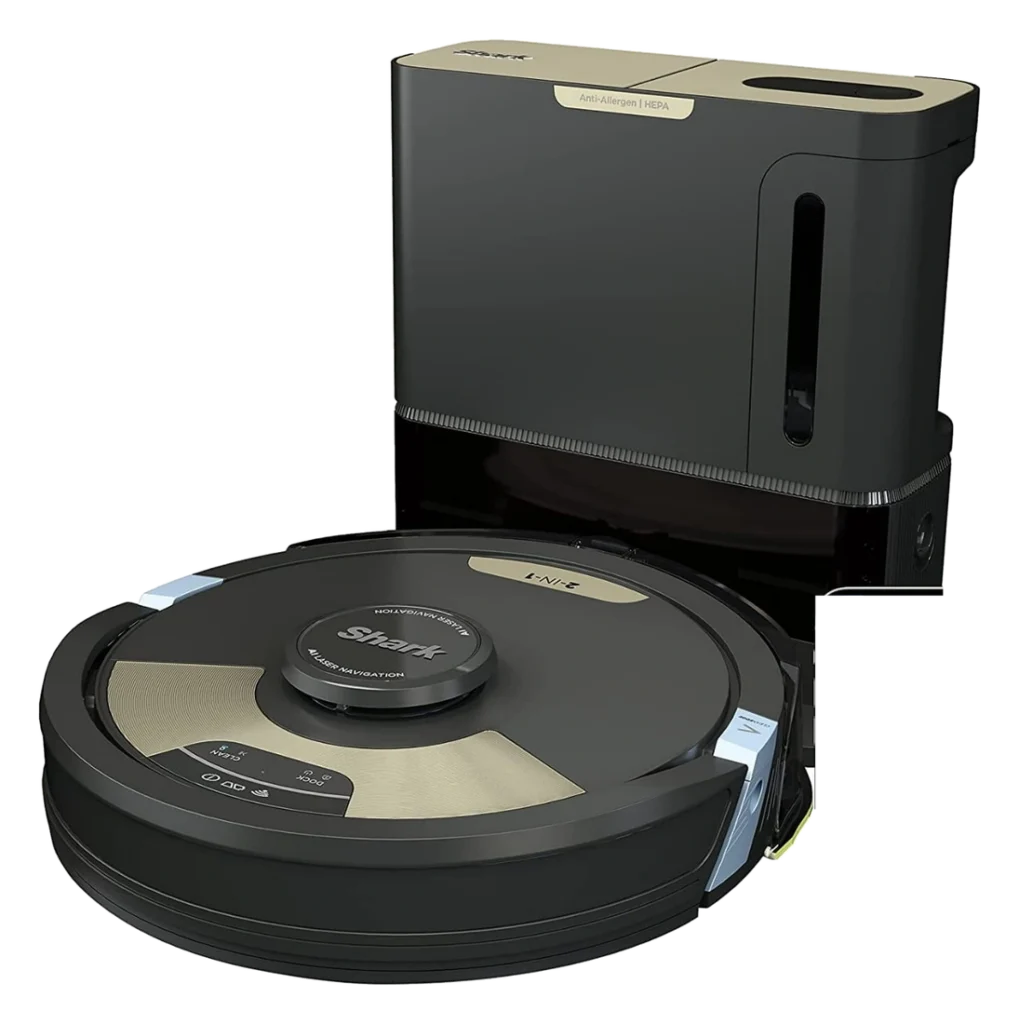
Will the Shark AI Ultra 2-in-1 work in your home?
Describe your home using the controls. Each choice reads the spec sheet for you, flagging where the Shark AI Ultra 2-in-1 is built for your space and where it isn’t.
A classification of fit for the conditions you set, not a recommendation. Verdicts describe engineering design intent, not test results.
The full spec sheet.
Priced below the category median, with every figure charted against the category below.
- Footprint
- 13.4 in dia · 3.85 in tall
- Weight
- 14.5 lbs
- Battery
- 75 Wh · Li-ion
- Wi-Fi
- 2.4 GHz only
- Voice
- Alexa, Google Home
- Dock type
- Auto-empty (bagless), dust only
360 degree LiDAR mapping with a sensor array for obstacle and drop detection; navigation processed on the robot
Position shows where the figure sits across the tracked category, not a quality judgment.
Living with it.
Strong 12-month track record with firmware stabilizing early cliff and WiFi detection issues.
200+ hour cycles documented without major hardware failures. Early Q1-Q2 firmware showed occasional cliff detection false positives and WiFi reconnect delays; subsequent patches stabilized both issues.
$699 to buy, then about $450 a year in replaceable parts. Over three years that is roughly $1,350 past the sticker price. Excludes electricity and any repairs.
CautionFall risk on shallow ramps: Cliff detection prevents standard stairs but shallow ramps under 8 inches may not trigger sensor.
NoteWater and damp floors: Mop mode leaves damp floors. Water residue can facilitate bacterial growth without drying.
CautionDock electrical hazard: Self-empty dock requires unsecured power outlet. Cord entanglement risk if pets access rear.
How the assessment has moved.
Every announcement, release and reassessment behind the current classification.
-
Aug 2026 · AssessmentRobovations Score revised 83 → 85
-
Aug 2026 · AssessmentRobovations Score rescored under v4.2: 79 → 83
-
Aug 2026 · AssessmentRobovations Score rescored under v4.0: 71 → 79
-
Jul 2026 · AssessmentRobovations Score revised 67 → 71
-
Jul 2026 · AssessmentRobovations Score revised 76 → 67
-
Apr 2026 · AssessmentRobovations Score recorded at 76 of 100
-
Jan 2022 · ReleaseRV2610WA Launches at Major US Retailers
How Shark AI Ultra 2-in-1 compares.

What people actually ask.
OperationHow does the AI obstacle detection work, and what categories of objects does it reliably identify?
CompatibilityCan the mop function operate without WiFi once mapping is complete?
OwnershipWhat do mop pads cost, and how often do they need replacing?
CompatibilityWhat happens if the dock loses power or WiFi during a cleaning or empty cycle?
OperationHow does it handle stairs and multi-level homes?
OperationWhat is the typical single-charge runtime, and how long does the dock take to empty?
 III
III
Dreame L10 Pro
 III
III
Ecovacs Deebot T30 Pro Omni
 III
III
Roborock S8 MaxV Ultra
Where it's sold
We may earn commission from qualifying purchases. This does not influence classification.
Reference the Shark AI Ultra 2-in-1 classification.
Embed the Autonomy Ladder™ mark or copy the citation. The mark is served from this record, so a reassessment updates it on your page automatically.
Get the embed code and citation
Scale proportionally only, up to 2× (536px wide)(224px wide). No recolouring, cropping, rotating, or re-typesetting.
Robovations. "Shark AI Ultra 2-in-1: Autonomy Level III (Conditional Autonomy)." Autonomy Ladder™, assessed August 2026. https://robovations.com/robots/shark-ai-ultra-2-in-1-robot-vacuum-and-mop/
- Link it. The mark must point at this record. An unlinked mark is not authorised.
- Hot-link it. Never download, self-host, or re-upload the image. A saved copy stops updating, and a mark that has stopped updating is a claim we no longer stand behind.
- A classification, not an endorsement. It may not appear beside language implying Robovations recommends, rates, or approves the product.