
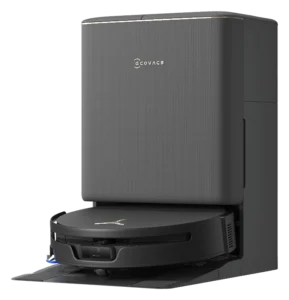
Ecovacs Deebot N8 Pro+
Smart navigation and self-emptying dock reduce hands-on burden. Mopping capability is present but secondary to vacuum function. Moderate owner effort required for mop-pad care.
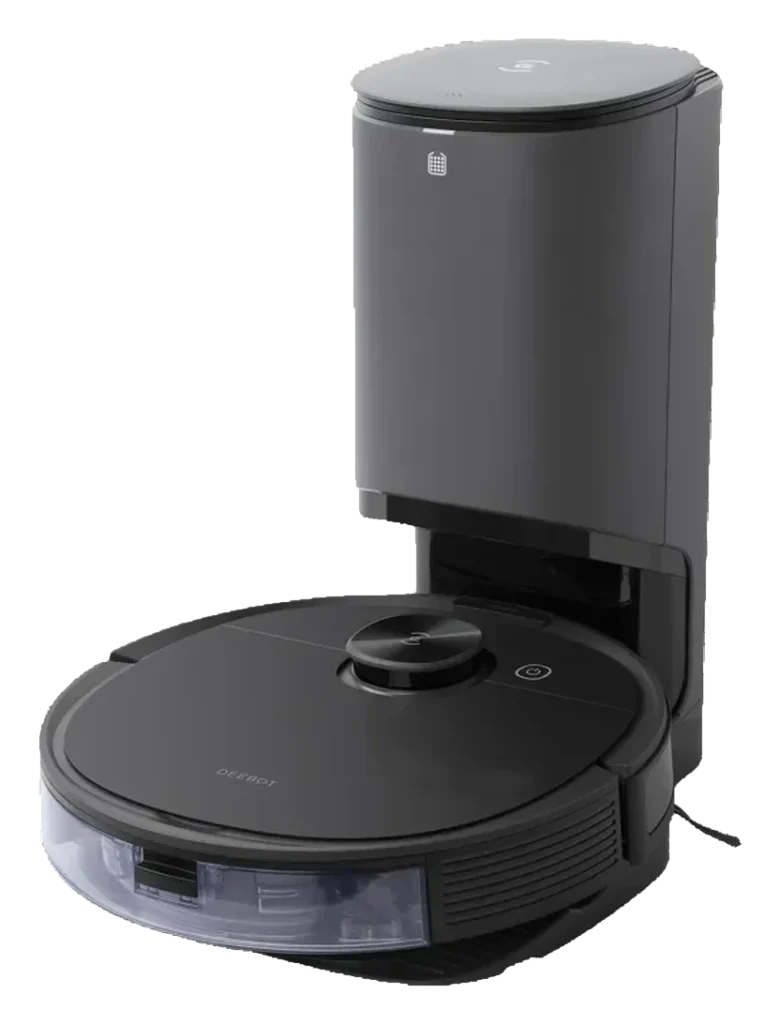
Will the Ecovacs Deebot N8 Pro+ work in your home?
Describe your home using the controls. Each choice reads the spec sheet for you, flagging where the Ecovacs Deebot N8 Pro+ is built for your space and where it isn’t.
A classification of fit for the conditions you set, not a recommendation. Verdicts describe engineering design intent, not test results.
Living with it.
Three years of firmware updates stabilized navigation; dock reliability remains the weak point.
↗ Improvingowner-reported arc
Owner reports show dock clogs from pet hair every 3-4 weeks. Navigation firmware improved in 2022-2023 cycle; cliff avoidance now reports sub-2% failure rate.
Wash by hand after a mopping run and refill the water tank (no cost). The station empties the dustbin itself.
Clean , usually no cost unless damage detected (~$20 if replacement needed).
Unclog dock filter; inspect side brush for pet hair (side brush ~$15).
Replace completely (~$20).
Replace if worn (roughly $30 for two pairs).
Replace the station's 2.5 L ; the interval follows the home rather than the calendar.Typical for robot vacuums: every 3-6 months
$699 to buy, then about $33 a year for the replaceable parts below. Over three years that is roughly $99 past the sticker price. Excludes electricity and any repairs.
- Typical for robot vacuums: annuallyWhere to buy Brush
- Typical for robot vacuums: every 3-6 monthsWhere to buy Dust bag
- Typical for robot vacuums: every 3-6 monthsWhere to buy Filter
- Typical for robot vacuums: every 3-6 months
Replacement cadence from the maintenance schedule; prices shown where the source documents them. Part links may earn a commission and do not influence the classification. All parts at Ecovacs
-
CautionDock power loss during auto-emptyDirt is trapped in dock until manual reset. Prolonged storage risks bacterial growth.
-
CautionPinch hazard at auto-empty openingDog/cat ears can enter dock opening during operation. Supervise households with small pets.
The full spec sheet.
Priced below the category median, with every figure charted against the category below.
- FootprintThe width, depth and height of the robot itself, without its dock.
- 13.8 in dia · 3.8 in tall•
- WeightThe robot alone, without its dock, as the maker states it.
- 7.2 lbs
- BatteryStored energy in watt-hours; a larger pack runs longer, not harder.
- 46 Wh · Li-ion•
- Wi-FiThe bands the robot can join; many models need a 2.4 GHz network to set up.
- 2.4 GHz only✓
- VoiceThe assistants the maker's app links to; the robot itself does not listen.
- Alexa✓
- Dust bagA bag inside the dock that the dock empties the robot's bin into; you replace the bag.
- 2.5 L•
- DockWhat the base does besides charging: empty the bin, wash and dry pads, refill water.
- Auto-empty, mop washing
- Threshold climbThe tallest lip the robot is rated to cross; a door sill is about 0.8 in.
- 0.5 in•
- Onboard dustbinThe bin inside the robot; an auto-empty dock moves its contents into a bag.
- 420 mL•
- Water tankThe clean-water tank that feeds the mop, on the robot or in the dock.
- 240 mL•
dToF TrueMapping laser navigation with TrueDetect 3D structured-light obstacle avoidance
Position shows where the figure sits across the tracked category, not a quality judgment. Suction in Pascals has no standard test method, and the published figure is a peak-mode claim, so it is comparable only within a brand and generation.
How the assessment has moved.
Every announcement, release and reassessment behind the current classification.
-
Sep 2026 · AssessmentRecord status: Verified → Provisional
-
Aug 2026 · AssessmentRobovations Score rescored under v4.2: 71 → 74
-
Jul 2026 · AssessmentRobovations Score recorded at 71 of 100
What people actually ask.
OperationDoes the N8 Pro+ mop every room or skip carpeted ones?
OperationHow often do you empty the auto-empty dock?
OperationCan it map multiple floors simultaneously or does it learn over time?
OperationWhat does it do if the dock loses power during auto-empty?
OperationIs there a water-heating option for mopping?
 III
III
Ecovacs Deebot T90 Max Plus Omni

 III
III
Ecovacs Deebot T90S Pro Omni
Where it's sold
We may earn commission from qualifying purchases. This does not influence classification.
Reference the Ecovacs Deebot N8 Pro+ classification.
Embed the Autonomy Ladder™ mark or copy the citation. The mark is served from this record, so a reassessment updates it on your page automatically.
Get the embed code and citation
Scale proportionally only, up to 2× (536px wide)(224px wide). No recolouring, cropping, rotating, or re-typesetting.
Robovations. "Ecovacs Deebot N8 Pro+: Autonomy Level III (Conditional Autonomy)." Autonomy Ladder™, assessed August 2026. https://robovations.com/robots/ecovacs-deebot-n8-pro/
- Link it. The mark must point at this record. An unlinked mark is not authorised.
- Hot-link it. Never download, self-host, or re-upload the image. A saved copy stops updating, and a mark that has stopped updating is a claim we no longer stand behind.
- A classification, not an endorsement. It may not appear beside language implying Robovations recommends, rates, or approves the product.