
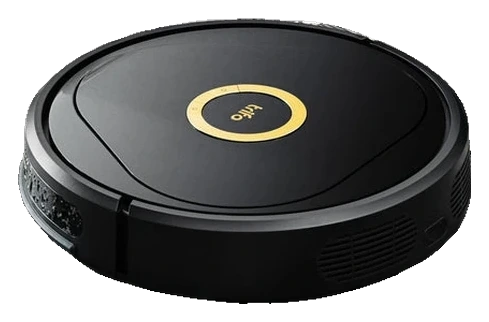
Trifo Lucy Ultra
Object recognition lifts navigation beyond prior Lucy versions, but the core autonomy posture (map-guided, obstacle-avoidant cleaning) stays conditional. You gain semantic framing for obstacles; the coverage pattern and operational scope remain Level III standard.
Will the Trifo Lucy Ultra work in your home?
Describe your home using the controls. Each choice reads the spec sheet for you, flagging where the Trifo Lucy Ultra is built for your space and where it isn’t.
A classification of fit for the conditions you set, not a recommendation. Verdicts describe engineering design intent, not test results.
Living with it.
TIRVS 3.0 detection improves obstacle-avoidance false-positives; dock and brush durability track category standard.
→ Stableowner-reported arc
Manufacturer released Lucy Ultra January 2024; ~18 months in market. Owner forums report stable navigation updates and rare dock mechanical failures. No major firmware regression or recall documented.
Tap the clean; wipe the camera lens with a dry cloth.
Replace or clean the primary (~$12-18); inspect the .
Rotate or replace the (~$15-20); verify dock contact cleanliness.
Check charging contacts and dock alignment after heavy use periods.
Empty and rinse the 252 ml dustbin; rinse the mop pad and empty any water left in the 366 ml tank.
$399 to buy, then about $100 a year for the replaceable parts below. Over three years that is roughly $300 past the sticker price. Excludes electricity and any repairs.
- Every 3-6 months$12–18
- Quarterly$15–20
Replacement cadence from the maintenance schedule; prices shown where the source documents them.
-
CautionCliff detection on stairs.Robot halts at stairs and does not descend; safe for multi-level homes with manual dock placement.
-
Pinch point at dock intake.Children and pets should avoid the dock air intake during operation.
The full spec sheet.
Priced below the category median, with every figure charted against the category below.
- FootprintThe width, depth and height of the robot itself, without its dock.
- 14.2 in dia · 3.3 in tall•
- WeightThe robot alone, without its dock, as the maker states it.
- 7.5 lbs
- Wi-FiThe bands the robot can join; many models need a 2.4 GHz network to set up.
- 2.4 + 5 GHz
- Onboard dustbinThe bin inside the robot; an auto-empty dock moves its contents into a bag.
- 252 mL
- Water tankThe clean-water tank that feeds the mop, on the robot or in the dock.
- 366 mL
- DockWhat the base does besides charging: empty the bin, wash and dry pads, refill water.
- Charge-only dock, no self-emptying
Laser mapping with Time-of-Flight obstacle sensors; onboard 1080p camera with night vision for monitoring and recording
Position shows where the figure sits across the tracked category, not a quality judgment. Suction in Pascals has no standard test method, and the published figure is a peak-mode claim, so it is comparable only within a brand and generation.
How the assessment has moved.
Every announcement, release and reassessment behind the current classification.
-
Aug 2026 · AssessmentRecord status: Verified → Provisional
-
Aug 2026 · AssessmentRobovations Score rescored under v4.2: 66 → 54
-
Jul 2026 · AssessmentRobovations Score recorded at 66 of 100
-
Sep 2024 · UpdateApp Update Expands Zone Control and Map Editing
-
Mar 2024 · ReleaseLaunches at Retail with TIRVS 3.0 at $499
-
Jan 2024 · AnnouncementWith TIRVS 3.0 Unveiled at CES 2024
What people actually ask.
OperationDoes the Lucy Ultra mop?
OperationWhat does the Lucy Ultra's camera do, and where does the video go?
OperationHow does the Lucy Ultra navigate?
OperationDoes the Lucy Ultra use disposable dust bags?
CompatibilityDoes the Lucy Ultra work with 5 GHz WiFi?
OperationCan the Lucy Ultra map multiple homes or floors?
OperationWhat happens if the Lucy Ultra encounters stairs?
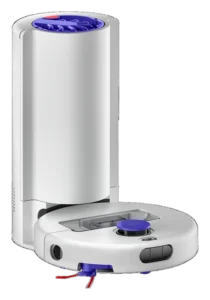 III
III
Dyson R1 Nurovi Dry
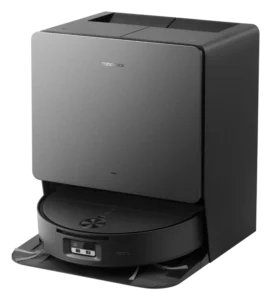 III
III
Roborock Saros 20 Flow Complete
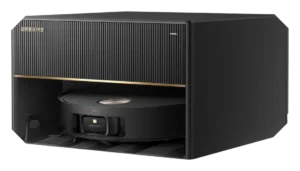 III
III
Dreame X50 Master

Where it's sold
We may earn commission from qualifying purchases. This does not influence classification.
We are no longer finding a current new-stock listing for this robot. Remaining offers may be used, refurbished, or third-party — confirm the condition and price on the retailer’s page before buying.
Reference the Trifo Lucy Ultra classification.
Embed the Autonomy Ladder™ mark or copy the citation. The mark is served from this record, so a reassessment updates it on your page automatically.
Get the embed code and citation
Scale proportionally only, up to 2× (536px wide)(224px wide). No recolouring, cropping, rotating, or re-typesetting.
Robovations. "Trifo Lucy Ultra: Autonomy Level III (Conditional Autonomy)." Autonomy Ladder™, assessed August 2026. https://robovations.com/robots/trifo-lucy-ultra/
- Link it. The mark must point at this record. An unlinked mark is not authorised.
- Hot-link it. Never download, self-host, or re-upload the image. A saved copy stops updating, and a mark that has stopped updating is a claim we no longer stand behind.
- A classification, not an endorsement. It may not appear beside language implying Robovations recommends, rates, or approves the product.