Skip to content
Saved
Comparison · 2 robots

iLife V3s Pro · Wyze Robot Vacuum

All robot vacuums. Every measure below is plotted against the full class, so a difference can be read against how much the class itself varies.
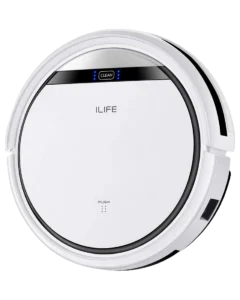
  1. iLife V3s Pro
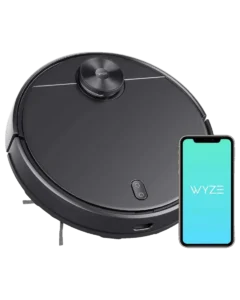
  2. Wyze Robot Vacuum
iLife

iLife V3s Pro

Autonomy
II Assisted Autonomy
Score
42/100 Limited
Readiness
Ready Now
Price
$160list
Wyze

Wyze Robot Vacuum

Autonomy
III Conditional Autonomy
Score
64/100 Capable
Readiness
Ready Now
Price
$250list

Up to three

01 Classification

What each one does on its own.

The Autonomy Ladder is the same five rungs for every robot on the site. A rung describes the conditions a robot handles without you, not how good it is.

V
Generalized
Any task, any setting
IV
Environmental
Handles new obstacles without help
III
Conditional
Finishes familiar jobs on its own
Wyze Robot Vacuum
II
Assisted
Runs preset routines, needs rescue
iLife V3s Pro
I
Manual
One action, on command
02 Assessment

Where they actually differ.

The Robovations Score is nine inputs across three pillars, each weighted as shown and each scored so that more is better. A robot can lead on one and trail on another, which is the point of showing them apart. Cost of ownership and data handling are reported on each robot's own page and are never averaged into the score.

Capability

Task completion16% of score
Does it finish the job it is sold to do, unattended
  • iLife V3s Pro30
  • Wyze Robot Vacuum65
18median 72 across 354 scored robots100
Coverage and navigation10% of score
Does it work the whole area, and hold that between runs
  • iLife V3s Pro27
  • Wyze Robot Vacuum65
15median 70 across 344 scored robots100
Edge-case recovery10% of score
Does it recover from the failures its category presents
  • iLife V3s Pro28
  • Wyze Robot Vacuum50
18median 50 across 261 scored robots100
Operating envelope4% of score
How far conditions can vary before performance drops
  • iLife V3s Pro28
  • Wyze Robot Vacuum34
25median 70 across 320 scored robots100

Dependability

Field failure rate16% of score
Documented hardware failures per owner-year
  • iLife V3s Pro64
  • Wyze Robot Vacuum94
6median 70 across 344 scored robots100
Software stability14% of score
Whether updates fix more than they break
  • iLife V3s Pro33
  • Wyze Robot Vacuum74
15median 65 across 275 scored robots100
Support longevity10% of score
Committed parts, service and updates, with dates
  • iLife V3s Pro58
  • Wyze Robot Vacuum43
0median 63 across 354 scored robots100

Ownership burden

Routine maintenance12% of score
Hands-on time it asks for in normal operation
  • iLife V3s Pro48
  • Wyze Robot Vacuum36
22median 68 across 355 scored robots100
Consumables8% of score
Parts that must be bought to keep it working
  • iLife V3s Pro57
  • Wyze Robot Vacuum86
30median 69 across 354 scored robots100
03 Measured against the class

How far apart is a long way?

A number only means something next to the spread it sits in. Each track below is the real range across every classified robot in the class, with the median marked.

Price193 with a published figure
  • iLife V3s Pro$160
  • Wyze Robot Vacuum$250
$129.99median $699.99$1,799
Runtime168 with a published figure
  • iLife V3s Pro100 min
  • Wyze Robot Vacuum110 min
60 minmedian 180 min360 min
Charge time150 with a published figure
  • iLife V3s Pro240 min
  • Wyze Robot Vacuum150 min
90 minmedian 240 min420 min
Noise148 with a published figure
  • iLife V3s Pro68 dB
  • Wyze Robot Vacuum68 dB
43 dBmedian 67 dB80 dB
Weight171 with a published figure
  • iLife V3s Pro4.9 lbs
  • Wyze Robot Vacuum7.2 lbs
3.3 lbsmedian 8.2 lbs36.4 lbs
Height189 with a published figure
  • iLife V3s Pro3 in
  • Wyze Robot Vacuum3.7 in
2.6 inmedian 3.8 in21.4 in

Not compared, because fewer than two of these robots carry a published figure: Suction.

04 Ownership

What the numbers leave out.

The trade-off

What each design gives up to be good at what it is good at.

iLife V3s Pro

This robot prioritizes cost over every other dimension. With no published suction figure, no brush roll and no mapping, the V3s Pro works as a maintenance sweep between full cleanings rather than a replacement for one. Owners pairing it with periodic deep cleaning report acceptable satisfaction; standalone reliance produces visible dirt accumulation.

Wyze Robot Vacuum

LiDAR mapping comes at the cost of suction power. At 2,100 Pa, the vacuum underperforms compared to similarly-priced competitors with 3,000-4,000 Pa. Wyze prioritized navigation sensors over motor capability, resulting in slower pickup and reduced effectiveness on obstacle edges and dark surfaces.

The charging station recharges but does not empty. Manual bin emptying every 2-3 cycles is required; unlike competitors with an auto-empty base, the Wyze demands active owner attention to maintain consistent performance.

Who each one is wrong for

Stated by the record itself. A robot being wrong for a household is a fact about fit, not a fault.

iLife V3s Pro
Multi-room or open-plan homes requiring systematic coverage
Random-walk navigation cannot plan efficient coverage routes. Robot revisits covered areas frequently and misses perimeter zones. Unsuitable for homes over 1,000 sqft.
Carpet-heavy or high-pile surfaces
iLife publishes no suction figure for the V3s Pro. What the design does establish is that there is no brush roll to agitate pile, so pickup depends on airflow alone. Owner reports document poor pickup on carpet of any type.
Homes with Wi-Fi integration, voice control, or smart-home needs
No app, no Wi-Fi, no voice control. Control is the button on the unit and an infrared remote, and the remote is where scheduling lives: one daily start time, set on the handset. Incompatible with any home-automation ecosystem.
Wyze Robot Vacuum
High-pile carpet or multi-level shag
Suction peaks at 2,100 Pa, below category baseline. Owner reports document inadequate pickup on high-pile surfaces and visible dirt residue after single passes.
Homes with frequent layout changes or tall thresholds
Saved maps need re-running when furniture is rearranged. Robot struggles with abrupt transitions (ramps, ledges over 1 inch).
Pet-heavy households or allergy-sensitive homes
Sub-2,100 Pa suction insufficient for embedded pet hair and dander accumulation. Manual bin emptying creates airborne dust during disposal; not suitable for allergy-prone residents.

What stays your job

The upkeep ownership hands back to you, whatever the autonomy level says.

iLife V3s Pro
  • Weekly: Empty dust bin; check the two side brushes for wound hair and straighten bent bristles (~2 min).
  • Weekly: Wipe cliff sensors with dry cloth to maintain stair-drop accuracy (~1 min).
  • Monthly: Rinse main filter under cool water; tap to dislodge dust accumulation.
  • Every 12-18 months: Replace the side brushes and filter. There is no brush roll on this machine, so there is no roller to service or replace.
  • Every 18-24 months: Replace battery if runtime drops below 60 minutes (~$30-40).
Wyze Robot Vacuum
  • After every 2-3 cycles: Empty dust bin into trash; tap filter to dislodge trapped particles.
  • Weekly: Wipe LiDAR lens with dry cloth to prevent humidity fogging (~1 min); inspect wheels for tangled hair or debris.
  • Monthly: Rinse or replace pre-filter if visibly dust-caked; check bin seal integrity (~3 min).
  • Every 6 months: Replace main filter (~$8-12); deep-clean all brush assemblies with running water.
  • Annually: Inspect wheel encoders for wear; replace dust bin if seal is cracked (~$15-20).
05 Evidence

How much each of these is standing on.

Classifications rest on different depths of evidence. A pre-release assessment and a verified one are not the same kind of claim.

Evidence behind each classification
Robot Evidence status Sources reviewed Last assessed
iLife V3s Pro Provisional 3 Aug 2026
Wyze Robot Vacuum Discontinued 3 Aug 2026

Robovations classifies robots; it does not rank them. Nothing on this page is a recommendation, and no manufacturer influences a classification or its placement here.