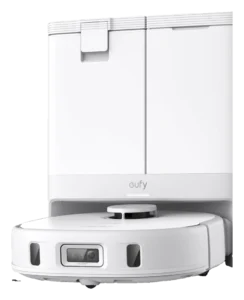
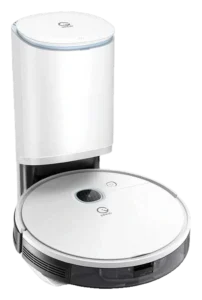
Eufy RoboVac X10 Pro Omni · Yeedi Vac Station
All robot vacuums. Every measure below is plotted against the full class, so a difference can be read against how much the class itself varies.
- Eufy RoboVac X10 Pro Omni
- Yeedi Vac Station


Yeedi Vac Station
- Autonomy
- IIIConditional Autonomy
- Score
- 57/100 Capable
- Readiness
- Not assessed
- Price
- $499list
Up to three
What each one does on its own.
The Autonomy Ladder is the same five rungs for every robot on the site. A rung describes the conditions a robot handles without you, not how good it is.
Where they actually differ.
The Robovations Score is nine inputs across three pillars, each weighted as shown and each scored so that more is better. A robot can lead on one and trail on another, which is the point of showing them apart. Cost of ownership and data handling are reported on each robot's own page and are never averaged into the score.
Capability
- Eufy RoboVac X10 Pro Omni81
- Yeedi Vac Station62
- Eufy RoboVac X10 Pro Omni88
- Yeedi Vac Station52
- Eufy RoboVac X10 Pro Omni65
- Yeedi Vac Station45
- Eufy RoboVac X10 Pro Omni70
- Yeedi Vac Station60
Dependability
- Eufy RoboVac X10 Pro Omni73
- Yeedi Vac Station80
- Eufy RoboVac X10 Pro Omni90
- Yeedi Vac Station65
- Eufy RoboVac X10 Pro Omni79
- Yeedi Vac Station40
Ownership burden
- Eufy RoboVac X10 Pro Omni87
- Yeedi Vac Station49
- Eufy RoboVac X10 Pro Omni43
- Yeedi Vac Station43
How far apart is a long way?
A number only means something next to the spread it sits in. Each track below is the real range across every classified robot in the class, with the median marked.
- Eufy RoboVac X10 Pro Omni$799
- Yeedi Vac Station$499
- Eufy RoboVac X10 Pro Omni8,000 Pa
- Yeedi Vac Station3,000 Pa
- Eufy RoboVac X10 Pro Omni170 min
- Yeedi Vac Station200 min
- Eufy RoboVac X10 Pro Omni360 min
- Yeedi Vac Station360 min
- Eufy RoboVac X10 Pro Omni64 dB
- Yeedi Vac Station66 dB
- Eufy RoboVac X10 Pro Omni10 lbs
- Yeedi Vac Station6.8 lbs
Not compared, because fewer than two of these robots carry a published figure: Height.
What the numbers leave out.
The trade-off
What each design gives up to be good at what it is good at.
Dock automation convenience costs about 14 by 18 inches of permanent floor space and adds setup and maintenance not present in dock-free competitors.
Pad washing and heated-air drying keep the mop usable between runs, but the wash tray, the two water tanks and the dock filter become recurring cleaning tasks a dock-free machine does not have.
Self-emptying moves the owner’s dust task from every run to roughly once a month, when the 2.5 liter bag is swapped. It does not remove the task, and the bag is a recurring purchase the sticker price does not show.
Visual mapping works well in bright, stable spaces but loses accuracy in low light or cluttered layouts compared to LIDAR navigation.
Who each one is wrong for
Stated by the record itself. A robot being wrong for a household is a fact about fit, not a fault.
- Carpet-heavy or high-pile interiors
- Mop engagement degrades significantly on thick carpeting. Requires manual pad removal or exclusive vacuum-only mode, negating the integrated mop advantage entirely.
- Frequent furniture movers or layout changers
- Room boundaries must be redrawn via app after permanent layout shifts. No voice control for on-the-fly boundary updates; remapping takes 30-45 min per change.
- Studios where no wall can give up floor space
- eufy publishes the station at 14.41 x 18.11 x 18.90 in, so it needs a permanent spot against a wall with a clear approach. That is roughly the footprint of a small side table rather than a closet, but in a studio it is still a piece of furniture that cannot be moved.
- Reflective, polished black-tile, or marble floors
- LiDAR navigation becomes erratic or stuck on specular surfaces. Requires external visual markers or manual no-go zones, negating autonomy promise on problem surfaces.
- Hard-water regions or poor consumable access
- Hard water leaves mineral film in the wash tray and around the water nozzles, adding a regular hand-cleaning task. Replacement pads and filters are difficult to source in some regions; third-party alternatives degrade performance.
- Homes with extensive high-pile or shag carpet
- Carpet detection raises suction on pile, but 3,000 Pa is mid-range and deep pile is where that ceiling shows. Low-pile carpet is within the machine's range; shag is not.
- Homes with poor lighting or many mirrors
- Camera-based navigation can become confused in low-light conditions or reflective spaces; LIDAR systems handle this better.
- Owners seeking operation with no hands-on tasks at all
- The dock empties the robot and nothing else is automated. The 2.5 liter bag is swapped about monthly, and the mop cloth and 0.24 liter tank are rinsed and filled by hand before every wet run.
- Multi-floor homes or homes requiring persistent multi-level mapping
- One map per floor; manual switching required. Does not auto-select optimal route across floors.
- Owners wanting real mopping rather than a damp wipe
- The mop is a microfiber cloth dragged behind the robot from a 0.24 liter tank, with no downward pressure and no pad washing at the dock. It wipes light surface dust rather than lifting dried spills.
What stays your job
The upkeep ownership hands back to you, whatever the autonomy level says.
- Weekly: Refill the dock’s 3 L clean-water tank and empty the dirty-water tank; check the dust bag status indicator.
- Monthly: Inspect mop pads for hardened residue, soak in warm water if soiled, replace if fraying visible. Wipe out the dock wash tray.
- Every 3-6 months: Replace dock HEPA pre-filter (~$20-30). Rinse the water tanks with clean water only; do not put vinegar or other household acids through the dock water circuit, as they corrode pump seals and valves.
- Quarterly: Deep clean the dock wash chamber with a soft brush to prevent mold in the water passages, especially in humid climates.
- As needed: Replace the 2.5 L dust bag when the station reports it full, typically around 60 days. Clear the LiDAR lens and secondary camera of dust if navigation accuracy degrades between scheduled cleanings.
- After each wet run: Rinse and dry the microfiber mop cloth; empty any water left in the 0.24 liter tank.
- Weekly: Wipe robot camera lens with soft cloth; check dock bag fill level.
- Monthly: Replace the 2.5 liter dock bag; yeedi rates it near 30 days and heavy shedding shortens that.
- Monthly: Clean vacuum motor exhaust vent and filter with dry brush; check wheel undercarriage for fiber wraps.
- As needed: Clear any hair or fiber blockages in the suction path between motor and dock.
- Seasonally: Check moisture accumulation in dock housing, especially in humid climates; ensure ventilation is unobstructed.
How much each of these is standing on.
Classifications rest on different depths of evidence. A pre-release assessment and a verified one are not the same kind of claim.
| Robot | Evidence status | Sources reviewed | Last assessed |
|---|---|---|---|
| Eufy RoboVac X10 Pro Omni | Verified | 15 | Aug 2026 |
| Yeedi Vac Station | Discontinued | 5 | Aug 2026 |
Add a robot
Comparing across classes is allowed — the page will switch to per-class positioning and tell you it has.