
- Changes
- 2
- Tracking since
- Oct 2022
- Latest
- Mar 20, 2024
- Net movement
- WaitReady Now
- 2024
-
eufy Clean app migration consolidates G40 Hybrid+ controls from eufy Home
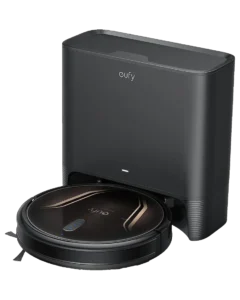
Anker Innovations completed the migration of its robot-vacuum lineup, including the G40 Hybrid+, from the eufy Home app to the rebranded eufy Clean application.
Full assessment
AutonomyL2 unchangedReadinessPromising Progress heldScoreScores unchangedThe platform rename consolidates vacuum product controls and updates the scheduling and zone-configuration UI. Capability gains are minimal; the change is primarily a product-line identity realignment. Owners on older firmware builds should verify app pairing remains active after the transition.
Impact on autonomy
- No navigation or mapping capability changes accompany the app rebranding
- Scheduling and cleaning-history features carry over without documented reduction in function
Impact on readiness
- App migration introduced temporary connectivity disruption for a subset of users during transition
- Consolidated app reduces need for owners to manage two separate eufy app identities
Claim check3 claims reviewed
Seamless migration to eufy Clean appMost users reported automatic migration; owner forum reports document temporary disconnects for a subset, resolved by re-pairing the dock in the new appImproved control experienceUI layout updated; core functionality (schedules, zones, cleaning history) preserved. No new autonomous capability added by the platform change per product documentationAll features preservedScheduling and zone-cleaning carried over; some owners noted cleaning history did not migrate fully, citing lost run records from the eufy Home periodBottom lineThe app rename is a product-line housekeeping move. The G40 Hybrid+ gains no new capability; owners need only confirm re-pairing if they experience post-migration connection issues.
Technical notes3 sections
- App Platform Transition
-
Anker Innovations renamed and replatformed its robot-vacuum application from eufy Home to eufy Clean across iOS and Android. The G40 Hybrid+ (model T2273111) was included in this migration. The eufy Clean app retains the scheduling, zone-configuration, and cleaning-history panels that existed in eufy Home.
- Owner Impact
-
The app transition is a lateral change: no additional navigation modes, no firmware revision accompanying the rebrand, and no change to the 2,200 Pa suction profile or dock behavior. Owner reports on retail review platforms document a subset of users needing to re-pair the self-empty dock after transitioning apps; the issue appeared tied to Bluetooth handshake caching rather than a product defect. Standard fix: force-quit the old app, install eufy Clean, and re-pair via the in-app device-add flow.
- Platform Context
-
The eufy Clean app consolidates Anker’s robot-vacuum line separate from its broader smart-home eufy ecosystem. For G40 Hybrid+ owners the practical impact is a new app icon and updated UI skin; underlying cloud scheduling and Wi-Fi connectivity remain on the same Anker infrastructure.
- 2022
-
Eufy Clean G40 Hybrid+ launches commercially with self-empty dock at $499
Anker Innovations launched the G40 Hybrid+ in the U.S. at an MSRP of $499, marking the brand's first budget gyro-nav robot with an integrated self-empty station.
Full assessment
AutonomyL2 confirmedReadinessWait → Promising ProgressScoreScores establishedThe self-empty dock differentiates the unit from prior non-dock Eufy budget models, shifting hands-on maintenance from weekly to roughly monthly.
WatchingWhether the dock bag fill-rate claims hold against owner reports over the first product cycle.
Impact on autonomy
- Gyro-only navigation classifies the unit at Level II; no persistent mapping added
- Simultaneous vacuum-and-mop operation enabled in a single pass on hard floors
- Carpet mop-lift detection adds conditional floor-type response without camera or LiDAR
Impact on readiness
- Retail availability at major U.S. chains marks transition from announced to shipping product
- Self-empty dock reduces owner bin-emptying from weekly to approximately monthly
- Setup time documented at 30-45 minutes including dock assembly and app pairing
Claim check4 claims reviewed
Hands-free emptying for up to 60 daysAnker reports 60-day intervals for typical 1,500 sqft homes; owner reports at launch range 3-6 weeks for higher use or shedding pets, per retail review aggregatesVacuums and mops in one passConfirmed by product specs: vacuum brush and drag-mop pads operate simultaneously on hard floors; on carpet, dock raises pads but robot continues vacuumingSmart dynamic navigationGyroscopic navigation without persistent room mapping; routes repeat from a fixed start point rather than adapting to layout changes, per product documentation2,200 Pa strong suctionManufacturer-specified suction figure; owner reports describe visible dirt remaining in high-pile carpet tufts, consistent with the pa figure being at the lower end of the hybrid-vacuum range in 2023Bottom lineThe dock differentiates the G40 Hybrid+ from prior budget Eufy models; the gyro-nav ceiling and mop-pad maintenance requirements are the trade-offs buyers carry forward from launch.
Technical notes3 sections
- Product Specification at Launch
-
Model number T2273111. Suction rated at 2,200 Pa. Navigation method: gyroscopic (no LiDAR, no camera-based vSLAM). Simultaneous vacuum-and-mop operation; mop pads lift automatically when carpet detected via floor sensor. Self-empty dock collects debris into a replaceable dust bag; Anker-stated capacity supports approximately 60-day intervals at standard use.
- Dock System
-
First Eufy budget-tier model to ship with an auto-empty station at launch rather than as a separately purchased add-on. Dock does not auto-wash or auto-refill mop pads; pad maintenance remains a manual step. Dust bag replacement bags available through Anker direct and major online retailers.
- App Platform
-
Launched under the eufy Clean app (iOS and Android), the consolidated app replacing the earlier eufy Home platform for robot-vacuum product lines. Scheduling, zone configuration, and cleaning history accessible through app; no on-device mapping display due to gyro-nav architecture.