Skip to content
Saved
Comparison · 2 robots

Dreame Z10 Pro · TP-Link Tapo RV30 Plus

All robot vacuums. Every measure below is plotted against the full class, so a difference can be read against how much the class itself varies.
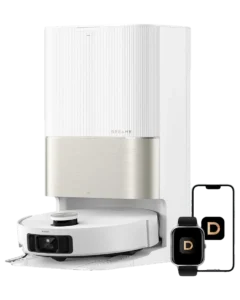
  1. Dreame Z10 Pro
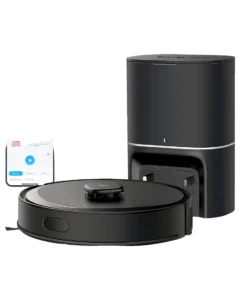
  2. TP-Link Tapo RV30 Plus
Dreame

Dreame Z10 Pro

Autonomy
III Conditional Autonomy
Score
65/100 Capable
Readiness
Ready Now
Price
$549list
TP-Link

TP-Link Tapo RV30 Plus

Autonomy
III Conditional Autonomy
Score
78/100 Strong
Readiness
Ready Now
Price
$599list

Up to three

01 Classification

What each one does on its own.

The Autonomy Ladder is the same five rungs for every robot on the site. A rung describes the conditions a robot handles without you, not how good it is.

V
Generalized
Any task, any setting
IV
Environmental
Handles new obstacles without help
III
Conditional
Finishes familiar jobs on its own
Dreame Z10 ProTP-Link Tapo RV30 Plus
II
Assisted
Runs preset routines, needs rescue
I
Manual
One action, on command
02 Assessment

Where they actually differ.

The Robovations Score is nine inputs across three pillars, each weighted as shown and each scored so that more is better. A robot can lead on one and trail on another, which is the point of showing them apart. Cost of ownership and data handling are reported on each robot's own page and are never averaged into the score.

Capability

Task completion16% of score
Does it finish the job it is sold to do, unattended
  • Dreame Z10 Pro72
  • TP-Link Tapo RV30 Plus70
Coverage and navigation10% of score
Does it work the whole area, and hold that between runs
  • Dreame Z10 Pro82
  • TP-Link Tapo RV30 Plus72
Edge-case recovery10% of score
Does it recover from the failures its category presents
  • Dreame Z10 Pro50
  • TP-Link Tapo RV30 Plus70
Operating envelope4% of score
How far conditions can vary before performance drops
  • Dreame Z10 Pro68
  • TP-Link Tapo RV30 Plus60

Dependability

Field failure rate16% of score
Documented hardware failures per owner-year
  • Dreame Z10 Pro73
  • TP-Link Tapo RV30 Plus91
Software stability14% of score
Whether updates fix more than they break
  • Dreame Z10 Pro65
  • TP-Link Tapo RV30 Plus86
Support longevity10% of score
Committed parts, service and updates, with dates
  • Dreame Z10 Pro32
  • TP-Link Tapo RV30 Plus76

Ownership burden

Routine maintenance12% of score
Hands-on time it asks for in normal operation
  • Dreame Z10 Pro59
  • TP-Link Tapo RV30 Plus81
Consumables8% of score
Parts that must be bought to keep it working
  • Dreame Z10 Pro51
  • TP-Link Tapo RV30 Plus80
03 Measured against the class

How far apart is a long way?

A number only means something next to the spread it sits in. Each track below is the real range across every classified robot in the class, with the median marked.

Price193 with a published figure
  • Dreame Z10 Pro$549
  • TP-Link Tapo RV30 Plus$599
$143median $699.99$1,799
Suction (mode not stated)169 with a published figure
  • Dreame Z10 Pro4,000 Pa
  • TP-Link Tapo RV30 Plus4,200 Pa
1,000 Pamedian 8,000 Pa36,000 Pa
Runtime168 with a published figure
  • Dreame Z10 Pro150 min
  • TP-Link Tapo RV30 Plus180 min
60 minmedian 180 min360 min
Charge time150 with a published figure
  • Dreame Z10 Pro180 min
  • TP-Link Tapo RV30 Plus210 min
90 minmedian 240 min420 min
Noise148 with a published figure
  • Dreame Z10 Pro66 dB
  • TP-Link Tapo RV30 Plus60 dB
43 dBmedian 67 dB80 dB
Weight171 with a published figure
  • Dreame Z10 Pro7.9 lbs
  • TP-Link Tapo RV30 Plus8.2 lbs
3.3 lbsmedian 8.2 lbs36.4 lbs
Height189 with a published figure
  • Dreame Z10 Pro3.9 in
  • TP-Link Tapo RV30 Plus3.7 in
2.6 inmedian 3.8 in21.4 in
04 Ownership

What the numbers leave out.

The trade-off

What each design gives up to be good at what it is good at.

Dreame Z10 Pro

The price reflects 2021 positioning: an auto-empty station at budget cost, with 4,000 Pa of suction that was competitive at launch. What it does not buy is any mop automation; the pad and its 150 ml tank are handled entirely by hand.

TP-Link Tapo RV30 Plus

Suction at 4,200 Pa reflects the mid-tier price point. Owner reports show capable performance on hard floors and low-pile carpet, with slower hair pickup on deep pile than 8,000+ Pa models achieve.

The auto-empty dock uses a 4 liter sealed bag that TP-Link rates for up to 70 days between changes. At that interval the consumable runs roughly five bags a year at $5-8 each, invisible at purchase but part of total cost of ownership.

Who each one is wrong for

Stated by the record itself. A robot being wrong for a household is a fact about fit, not a fault.

Dreame Z10 Pro
Owners expecting the dock to service the mop as well
The station takes a sealed 4 L dust bag and does nothing else. There is no water tank in it, no pad washing and no pad drying; the 150 ml tank is refilled and the pad rinsed by hand after every mopping run.
Multi-floor or sprawling homes exceeding 1,500 sq ft
Rated runtime is 150 minutes per charge. Multi-floor homes mean carrying the robot and relocating the dock by hand, since the station only serves the floor it stands on.
Mixed hard floor and carpet cleaned in one pass
The mop module has no lift. Left fitted, the pad drags across any carpet the robot crosses, so mixed-floor homes either exclude those rooms in the app or unclip the module and run two passes.
Owners judging this machine on mopping performance
It does mop: a 150 ml tank and microfiber pad clip to the underside, with three water-flow levels. It is a drag pad with no downward pressure, no lift and no dock washing, and reviewers rate the result as light damp wiping rather than cleaning. Households that want a floor genuinely mopped need a pressure or roller design.
Owners requiring ongoing feature updates or app improvements
The Z10 Pro is discontinued and its update history is not documented in any changelog this record has reviewed, so continued firmware work should not be assumed either way. Treat the app and navigation as a fixed platform.
TP-Link Tapo RV30 Plus
High-pile carpet or heavy pet-hair environments
Suction at 4,200 Pa sits mid-range against flagship models (8,000-22,000 Pa). Owner reports document slower pickup on deep pile and residue remaining after a single pass in heavy-shedding homes.
Homes requiring true hands-off operation
Auto-empty dock reduces bin-emptying frequency but does not eliminate all maintenance. Monthly dust-bag replacement and dock filter cleaning are required.
Homes with 5 GHz-only Wi-Fi or unstable 2.4 GHz networks
Requires 2.4 GHz connectivity. Homes lacking stable 2.4 GHz band report frequent mapping dropouts and schedule failures.

What stays your job

The upkeep ownership hands back to you, whatever the autonomy level says.

Dreame Z10 Pro
  • After each mopping run: Rinse the microfiber pad and empty the 150 ml tank; unclip the module before any run that crosses carpet.
  • Every 2 months: Replace the sealed 4 L dock bag; Dreame rates it at more than two months of typical use, and reviewers measured about 65 days. Bags are sold in multipacks.
  • Every 3 months: Tap or rinse main brush to remove hair tangles and maintain suction.
  • Every 6 months: Replace filter (~$12-18 per filter) or rinse and air-dry existing filter if lightly soiled.
  • Every 6-12 months: Clean dock seals and interior contacts to prevent dust leakage or charging issues.
  • As needed: Remove side-brush tangles between cycles if pet hair or carpet fibers present.
TP-Link Tapo RV30 Plus
  • Weekly: Inspect dust bag seal in dock for visible dust leakage; wipe exterior if dusty (~1 min).
  • Monthly: Clean dock filter with dry cloth (~3 min); clean main vacuum filter by tapping against trash. Vacuum filter replacement every 6 months (~$12-15).
  • Every 70 days: Replace the 4 liter sealed dust bag in the auto-empty dock (~$5-8 per bag). TP-Link rates a bag for up to 70 days; heavy-shedding homes reach it sooner.
  • Every 3-6 months: Wipe LiDAR lens with dry cloth to prevent navigation errors; inspect side brush for tangled hair.
  • Quarterly: Deep-clean dock interior with vacuum to remove settled dust particles from the auto-empty chamber (~5 min).
05 Evidence

How much each of these is standing on.

Classifications rest on different depths of evidence. A pre-release assessment and a verified one are not the same kind of claim.

Evidence behind each classification
Robot Evidence status Sources reviewed Last assessed
Dreame Z10 Pro Discontinued 6 Aug 2026
TP-Link Tapo RV30 Plus Verified 6 Aug 2026

Robovations classifies robots; it does not rank them. Nothing on this page is a recommendation, and no manufacturer influences a classification or its placement here.