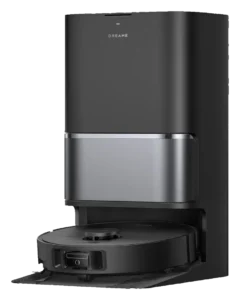
Dreame L40 Ultra · Dreame X60 Ultra
All robot vacuums. Every measure below is plotted against the full class, so a difference can be read against how much the class itself varies.
- Dreame L40 Ultra
- Dreame X60 Ultra
What each one does on its own.
The Autonomy Ladder is the same five rungs for every robot on the site. A rung describes the conditions a robot handles without you, not how good it is.
Where they actually differ.
The Robovations Score is nine inputs across three pillars, each weighted as shown and each scored so that more is better. A robot can lead on one and trail on another, which is the point of showing them apart. Cost of ownership and data handling are reported on each robot's own page and are never averaged into the score.
Capability
- Dreame L40 Ultra97
- Dreame X60 Ultra82
- Dreame L40 Ultra79
- Dreame X60 Ultra70
- Dreame L40 Ultra84
- Dreame X60 Ultra62
- Dreame L40 Ultra75
- Dreame X60 Ultra80
Dependability
- Dreame L40 Ultra94
- Dreame X60 Ultra56
- Dreame L40 Ultra90
- Dreame X60 Ultra50
- Dreame L40 Ultra82
- Dreame X60 Ultra85
Ownership burden
- Dreame L40 Ultra100
- Dreame X60 Ultra75
- Dreame L40 Ultra83
- Dreame X60 Ultra89
How far apart is a long way?
A number only means something next to the spread it sits in. Each track below is the real range across every classified robot in the class, with the median marked.
- Dreame L40 Ultra$1,499
- Dreame X60 Ultra$1,349
- Dreame L40 Ultra11,000 Pa
- Dreame X60 Ultra35,000 Pa
- Dreame L40 Ultra194 min
- Dreame X60 Ultra180 min
- Dreame L40 Ultra61 dB
- Dreame X60 Ultra67 dB
- Dreame L40 Ultra8.8 lbs
- Dreame X60 Ultra10.4 lbs
- Dreame L40 Ultra3.8 in
- Dreame X60 Ultra3.1 in
Not compared, because fewer than two of these robots carry a published figure: Charge time.
What the numbers leave out.
The trade-off
What each design gives up to be good at what it is good at.
The side-extend mop arm unlocks edge coverage without adding mechanical drag, but it remains a passive extension that cannot navigate around furniture or adjust for novel layouts; mop effectiveness at edges depends on carpet texture and initial arm positioning.
Dock hot-air mop drying reduces manual dry-time while adding dock cycle complexity. Drying cycles add 30-45 minutes to full dock operation; overnight scheduling is practical, on-demand mopping is not.
The 212 degree F pad wash is real, and it is bounded by what the dock holds: a 4.2 litre clean tank and a 3 litre dirty tank that a large home works through before both need hand attention.
LiDAR navigation is robust on stable maps, but multi-floor handoff reliability degrades when furniture moves without map reset.
Who each one is wrong for
Stated by the record itself. A robot being wrong for a household is a fact about fit, not a fault.
- Homes with high-pile carpet or thick rugs
- Mop pads lift when the robot detects carpet, which covers low pile. Thick and shag pile is better excluded with a no-mop zone, and vacuum-only mode covers those rooms.
- Owners wanting zero water management
- The station refills the robot's tank and its cleaning solution on its own, but the station's 4.5 L clean-water reservoir is filled by hand and the dirty-water tank emptied. A station that plumbs into a water line is the only design that removes that step entirely.
- Buyers working to a mid-range budget
- List price is $1,499, commonly nearer $1,000 on the street. The extending mop arm and the full-service station are what that buys; a simpler dock covers the same floors with more owner involvement for less money.
- Renters or homes with frequent layout changes
- Effective operation depends on stable maps. Furniture rearrangement requires remapping. No documented quick-reset feature for iterative home changes.
- Homes relying on 5GHz-only Wi-Fi networks
- Dreame app operates on 2.4GHz. Dual-band routers required. No WiFi6E or mesh-network fallback documented.
- Households unwilling to put a camera on the floor
- Obstacle recognition uses an RGB camera alongside 3D structured light and a retractable LiDAR, covering 280-plus object classes, and the robot is cloud-connected. Where camera frames are processed and what the app's remote view exposes has not been established.
- Homes with nowhere to put a large dock
- The 10-in-1 dock is not optional and not small. It holds a 4.2 litre clean tank and a 3 litre dirty tank, heats water, and needs a mains outlet with clearance around it. In a small apartment the dock is the larger of the two objects.
What stays your job
The upkeep ownership hands back to you, whatever the autonomy level says.
- Weekly: Top up the station’s clean-water reservoir and empty the dirty-water tank; the station refills the robot itself between runs.
- Monthly: Rinse the washable HEPA filter and let it dry fully before refitting. Dreame’s guidance is cleaning rather than scheduled replacement.
- Monthly: Clear hair from the main brush and side brush; wipe the wash tray the mop pads sit in.
- Every few weeks: Replace the 3.2 L dust bag in the base when the app reports it full. A bag runs to weeks rather than days in a typical home.
- As pads wear: Replace the mop pads when they stop coming out of a wash cycle clean.
- After every use: Empty and rinse the 3 litre dirty tank; top up the 4.2 litre clean tank.
- Weekly: Rinse the dock wash bay, and clear hair and fibre from the brush and the mop pads.
- Monthly: Wash or replace the filter when the app calls for it, and check the pads for matting.
- Every 3-6 months: Descale the dock’s heating path in hard-water areas, and replace the side brush.
- Annually: Deep-clean the dock intake and the dust bag compartment.
How much each of these is standing on.
Classifications rest on different depths of evidence. A pre-release assessment and a verified one are not the same kind of claim.
| Robot | Evidence status | Sources reviewed | Last assessed |
|---|---|---|---|
| Dreame L40 Ultra | Verified | 10 | Aug 2026 |
| Dreame X60 Ultra | Verified | 5 | Sep 2026 |
Add a robot
Comparing across classes is allowed — the page will switch to per-class positioning and tell you it has.
