Skip to content
Saved
Comparison · 2 robots

Roborock Qrevo 2 Pro · Yeedi Mop Station Pro

All robot vacuums. Every measure below is plotted against the full class, so a difference can be read against how much the class itself varies.
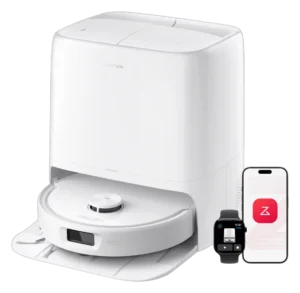
  1. Roborock Qrevo 2 Pro
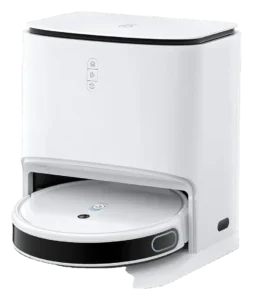
  2. Yeedi Mop Station Pro

Up to three

01 Classification

What each one does on its own.

The Autonomy Ladder is the same five rungs for every robot on the site. A rung describes the conditions a robot handles without you, not how good it is.

V
Generalized
Any task, any setting
IV
Environmental
Handles new obstacles without help
III
Conditional
Finishes familiar jobs on its own
Roborock Qrevo 2 ProYeedi Mop Station Pro
II
Assisted
Runs preset routines, needs rescue
I
Manual
One action, on command
02 Assessment

Where they actually differ.

The Robovations Score is nine inputs across three pillars, each weighted as shown and each scored so that more is better. A robot can lead on one and trail on another, which is the point of showing them apart. Cost of ownership and data handling are reported on each robot's own page and are never averaged into the score.

Capability

Task completion16% of score
Does it finish the job it is sold to do, unattended
  • Roborock Qrevo 2 Pro75
  • Yeedi Mop Station Pro55
18median 72 across 429 scored robots100
Coverage and navigation10% of score
Does it work the whole area, and hold that between runs
  • Roborock Qrevo 2 Pro75
  • Yeedi Mop Station Pro62
0median 70 across 417 scored robots100
Edge-case recovery10% of score
Does it recover from the failures its category presents
  • Roborock Qrevo 2 Pro55
  • Yeedi Mop Station Pro45
18median 52 across 318 scored robots100
Operating envelope4% of score
How far conditions can vary before performance drops
  • Roborock Qrevo 2 Pro65
  • Yeedi Mop Station Pro50
28median 68 across 393 scored robots100

Dependability

Field failure rate16% of score
Documented hardware failures per owner-year
  • Roborock Qrevo 2 Pro70
  • Yeedi Mop Station Pro91
6median 70 across 355 scored robots100
Software stability14% of score
Whether updates fix more than they break
  • Roborock Qrevo 2 Pro25
  • Yeedi Mop Station Pro82
15median 65 across 340 scored robots100
Support longevity10% of score
Committed parts, service and updates, with dates
  • Roborock Qrevo 2 Pro68
  • Yeedi Mop Station Pro35
0median 62 across 425 scored robots100

Ownership burden

Routine maintenance12% of score
Hands-on time it asks for in normal operation
  • Roborock Qrevo 2 Pro80
  • Yeedi Mop Station Pro62
22median 67 across 430 scored robots100
Consumables8% of score
Parts that must be bought to keep it working
  • Roborock Qrevo 2 Pro60
  • Yeedi Mop Station Pro40
8median 69 across 430 scored robots100
03 Measured against the class

How far apart is a long way?

A number only means something next to the spread it sits in. Each track below is the real range across every classified robot in the class, with the median marked.

Price214 with a published figure
  • Roborock Qrevo 2 Pro$799.99
  • Yeedi Mop Station Pro$799
$160median $799.99$2,599
Suction (mode not stated)207 with a published figure
  • Roborock Qrevo 2 Pro20,000 Pa
  • Yeedi Mop Station Pro3,000 Pa
1,000 Pamedian 10,000 Pa42,000 Pa
Runtime186 with a published figure
  • Roborock Qrevo 2 Pro253 min
  • Yeedi Mop Station Pro180 min
60 minmedian 180 min360 min
Noise156 with a published figure
  • Roborock Qrevo 2 Pro54 dB
  • Yeedi Mop Station Pro60.8 dB
43 dBmedian 67 dB80 dB

Not compared, because fewer than two of these robots carry a published figure: Charge time, Weight, Height.

04 Ownership

What the numbers leave out.

The trade-off

What each design gives up to be good at what it is good at.

Roborock Qrevo 2 Pro

The dock washes and dries mop pads at temperatures usually reserved for pricier docks, but structured-light sensors cannot see a charging cable the way a camera-equipped flagship can.

Auto Mop Removal parks the mop before carpet; carpet-border misreads however still let the robot begin mopping onto an area rug until a no-mop zone is drawn.

2.4GHz-only Wi-Fi: a home running a merged or 5GHz-first network may need to split bands before the robot will connect.

Yeedi Mop Station Pro

Mop wash every 2-3 runs reduces flexibility; you cannot run vacuum-only for a week, then resume mopping from a cold dock.

The station automates pad washing but not dust disposal: there is no auto-empty, so the onboard bin still has to be emptied by hand after multi-room runs.

Who each one is wrong for

Stated by the record itself. A robot being wrong for a household is a fact about fit, not a fault.

Roborock Qrevo 2 Pro
Floors with loose cables, cords, or ribbons
Independent testing found the robot picks up nearly every unflattened cable it crosses; its structured-light sensors cannot distinguish thin cords from open floor the way a camera can.
Networks that only offer 5GHz Wi-Fi
The robot connects on 2.4GHz exclusively; a router broadcasting only a 5GHz band, or one merged without a 2.4GHz option, will not complete setup.
Large homes above roughly 3,000 sq ft
No independent test of coverage above 3,000 sq ft was found; the 253-minute rated runtime is unconfirmed against a layout this size in a single session.
Deep or high-pile carpet needing verified deep-clean suction
20,000 Pa is a mid-tier suction figure and no independent test of thick, high-pile carpet performance has been published for this specific model.
Homes with area rugs needing hands-off no-mop zoning
A documented review found the robot began wetting a dining room rug before its boundary was manually outlined; carpet-edge detection is not fully automatic on rugs.
Yeedi Mop Station Pro
Homes with deep-pile carpet, shag, or high-shedding area rugs
Carpet detection lifts and parks the mop module rather than dragging it, and suction steps between three published tiers: 600 Pa on bare floor, 1,500 Pa on shallow carpet, 3,000 Pa on deep pile. Coverage on shag and other long-pile constructions is not documented by Yeedi.
Apartments with 5 GHz-only Wi-Fi or no 2.4 GHz band
Yeedi dock firmware defaults to 2.4 GHz. App scheduling and firmware updates require this band; 5 GHz-only networks require manual mesh reconfiguration or dual-band router upgrade.
Users needing stain removal or deep-clean mop capability
The pads wipe with unheated water at a fixed 10 N of pressure. There is no heated wash, no detergent dosing and no scrubbing mode for embedded soil; daily light refresh is the design target.

What stays your job

The upkeep ownership hands back to you, whatever the autonomy level says.

Roborock Qrevo 2 Pro
  • Weekly: Check the main brush and side brush for tangled hair, cables, or cords.
  • Monthly: Empty or replace the dock’s self-sealing dust bag and wipe the water tank.
  • Every 3-6 months: Replace mop pads and inspect the main brush for wear.
  • Every 3-6 months: Rinse or replace the washable filter per manufacturer guidance.
  • Annually: Replace the side brush and check the dock’s heating element for scale buildup.
  • As needed: Reseat the dust-roller compartment if the robot will not dock; one review documented this out of the box.
Yeedi Mop Station Pro
  • Every 2-3 runs: Dock auto-washes the pads with clean water from its tank; no manual intervention unless error alerts trigger.
  • Weekly: Refill the 3.5 L clean-water tank and empty the 3.5 L waste tank (typical homes cycle 2-3 L per week).
  • Monthly: Rinse the dock tray and scrubbing rib; check the pads for matting or trapped grit.
  • Every 3-6 months: Replace the mop-pad set; inspect brush bristles and edge-sweeper hairs for wear.
  • As needed: Empty the dustbin (auto-empty dock not included; manual emptying required after each multi-room run).
  • Annually: Run the app’s software-health diagnostics.
05 Evidence

How much each of these is standing on.

Classifications rest on different depths of evidence. A pre-release assessment and a verified one are not the same kind of claim.

Evidence behind each classification
Robot Evidence status Sources reviewed Last assessed
Roborock Qrevo 2 Pro Provisional 9 Sep 2026
Yeedi Mop Station Pro Provisional 3 Aug 2026

Robovations classifies robots; it does not rank them. Nothing on this page is a recommendation, and no manufacturer influences a classification or its placement here.