Moflin · Yukai Engineering Qoobo
All specialty robots. Every measure below is plotted against the full class, so a difference can be read against how much the class itself varies.
- Moflin
- Yukai Engineering Qoobo
What each one does on its own.
The Autonomy Ladder is the same five rungs for every robot on the site. A rung describes the conditions a robot handles without you, not how good it is.
Where they actually differ.
The Robovations Score is nine inputs across three pillars, each weighted as shown and each scored so that more is better. A robot can lead on one and trail on another, which is the point of showing them apart. Cost of ownership and data handling are reported on each robot's own page and are never averaged into the score.
Capability
- Moflin62
- Yukai Engineering Qoobo50
- Moflin38
- Yukai Engineering Qoobo0
- Moflin45
- Yukai Engineering Qoobo60
- Moflin40
- Yukai Engineering Qoobo70
Dependability
- Moflin64
- Yukai Engineering Qoobo70
- Moflin45
- Yukai Engineering Qoobo33
- Moflin62
- Yukai Engineering Qoobo45
Ownership burden
- Moflin45
- Yukai Engineering Qoobo85
- Moflin50
- Yukai Engineering Qoobo90
How far apart is a long way?
A number only means something next to the spread it sits in. Each track below is the real range across every classified robot in the class, with the median marked.
- Moflin$429
- Yukai Engineering Qoobo$199.99
- Moflin300 min
- Yukai Engineering Qoobo480 min
- Moflin0.6 lbs
- Yukai Engineering Qoobo2.2 lbs
- Moflin3.5 in
- Yukai Engineering Qoobo5.9 in
Not compared, because fewer than two of these robots carry a published figure: Suction, Charge time, Noise.
What the numbers leave out.
The trade-off
What each design gives up to be good at what it is good at.
Processing audio on-device limits cloud dependency, but also limits Moflin to reacting to tone and touch rather than understanding spoken words.
Having no camera reduces its data-privacy footprint, but also means it cannot recognize faces or navigate.
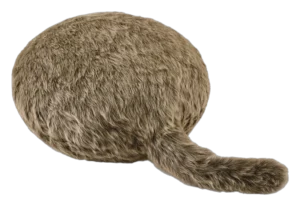
The tail is the whole machine: two servos and an accelerometer, with no voice, no face and no sound reaction.
Unprompted wags make it feel alive, and they also mean the motor can buzz when nobody is touching it.
Full-size comfort, fixed-size footprint: portability is what the smaller Petit Qoobo is for.
Who each one is wrong for
Stated by the record itself. A robot being wrong for a household is a fact about fit, not a fault.
- Buyers wanting a mobile or task-performing robot
- Moflin has no wheels or legs and performs no household task; it does not move from where it is placed.
- Households wanting voice-command or conversational features
- Moflin reacts to voice tone, not spoken commands or conversation; it has no chatbot or assistant function.
- Anyone needing more than about 5 hours between charges
- Battery life is limited to approximately 5 hours of active use per the manufacturer.
- Buyers wanting a companion that reacts to voice or sound
- Yukai lists sound and voice reaction for Petit Qoobo, not the full-size model, and iFixit's teardown of Qoobo documents an accelerometer and servos with no microphone.
- Anyone expecting a pet robot that moves around the room
- The body stays where it is placed. The teardown shows two servos dedicated to the tail and no wheels, legs or drive motor.
- Light sleepers planning to use it as a bedside pillow
- The motor is audible, and Digital Trends reports the tail wagging on its own without being touched, so the buzz can arrive unprompted in a quiet room.
- People wanting a comfort device that fits in a bag
- At roughly 52 cm long and 1 kg it is a full cushion. Yukai positions the smaller Petit Qoobo as the portable version.
- Care settings that need spare covers to rotate between users
- Yukai support states the fur covers cannot be purchased separately, so washing the single cover is the only way to refresh it.
What stays your job
The upkeep ownership hands back to you, whatever the autonomy level says.
- Daily: Return Moflin to its charging base; it cannot reach the base itself, and a charge delivers approximately 5 hours of active use with an approximately 3.5 hour recharge, per Casio.
- As needed: Wipe soiled fur with a cloth moistened with water or mild detergent and wrung out, per Casio’s care instructions; never wash it, splash it, or launder the fur.
- As needed: Contact Casio support if the fur loses its softness or becomes heavily soiled; the fur is not owner-removable.
- As needed: Apply updates through the MofLife companion app over Bluetooth.
- As needed: Keep it within Casio’s stated operating range, 5-35 degrees C and 20-80 percent humidity, non-condensing.
- Weekly: Recharge with the included AC adaptor; Digital Trends’ reviewer charged about weekly with evening-only use.
- As needed: Recharge when the LED flashes every 4 seconds, Yukai’s low-battery signal; a full charge takes 4 to 8 hours.
- As needed: Unzip the fur cover and soak it in lukewarm water with laundry detergent; Yukai warns the texture may change.
- As needed: Let it rest about 30 minutes if the tail stops after a long petting session, per Yukai support.
- As needed: Keep use within Yukai’s 10 to 35 C and 20 to 80% humidity operating range.
How much each of these is standing on.
Classifications rest on different depths of evidence. A pre-release assessment and a verified one are not the same kind of claim.
| Robot | Evidence status | Sources reviewed | Last assessed |
|---|---|---|---|
| Moflin | Verified | 11 | Aug 2026 |
| Yukai Engineering Qoobo | Verified | 10 | Sep 2026 |
Add a robot
Comparing across classes is allowed — the page will switch to per-class positioning and tell you it has.