Review: Shark AI Ultra 2-in-1
Evaluating: Shark AI Ultra 2-in-1

 Autonomy grade based on our classification methodology.
Structured review — not a purchase recommendation.
The Shark AI Ultra 2-in-1 offers strong vacuuming performance with advanced navigation and a self-emptying base, reducing daily maintenance. Its mopping function, while effective, requires manual setup, which may not suit users seeking full automation. Overall, it provides a balanced solution for those prioritizing vacuuming with occasional mopping needs. Key strength: Effective vacuuming performance with Matrix Clean Navigation ensuring thorough coverage. Key concern: Mopping function requires manual setup and cannot automatically transition between modes. Scored 76/100, tracked at Autonomy Level 3 (Conditional Autonomy) by Robovations.
Review Summary
Based on published evidence and our classification methodology.
- Effective vacuuming performance with Matrix Clean Navigation ensuring thorough coverage
- Self-emptying base with HEPA filter reduces maintenance frequency
- Advanced 360° LiDAR vision enables accurate navigation and obstacle avoidance
- Strong pet hair pickup capabilities, beneficial for pet owners
- Mopping function requires manual setup and cannot automatically transition between modes
- App lacks real-time tracking and multi-floor mapping features
- Self-emptying process can be noisy, which may be disruptive
- Cannot detect and avoid carpets during mopping, requiring manual intervention to prevent wetting carpets
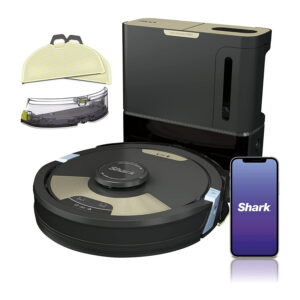
The Shark AI Ultra 2-in-1 is designed to handle both vacuuming and mopping tasks, aiming to provide a comprehensive cleaning solution for various floor types. Our evaluation indicates that it delivers strong vacuuming performance, particularly on hardwood floors, and effectively navigates around obstacles using its 360° LiDAR vision. However, the mopping function necessitates manual setup and intervention, which may not align with users seeking a fully autonomous mopping experience.
In terms of performance, the vacuum’s Matrix Clean Navigation ensures thorough coverage by making multiple passes over each area, enhancing debris pickup. Users have reported that the self-emptying base, equipped with a HEPA filter, simplifies maintenance by holding up to 60 days’ worth of debris. Despite these strengths, the mopping feature requires manual attachment of the water tank and mop pad, and the robot cannot automatically transition between vacuuming and mopping modes, limiting its autonomy in this aspect.
The Shark AI Ultra 2-in-1 is well-suited for individuals prioritizing efficient vacuuming with occasional mopping needs. Its advanced navigation and self-emptying capabilities reduce daily maintenance efforts. However, those seeking a fully autonomous mopping experience may find the manual setup requirements less convenient.
Autonomy Ladder™ Classification
Assigned using the Autonomy Ladder based on observed performance.
Conditional AutonomyJustification
We classify the Shark AI Ultra 2-in-1 at Level 3 (Conditional Autonomy). It autonomously vacuums and returns to its base for self-emptying but requires manual intervention for mopping tasks, such as attaching the water tank and mop pad.
Observed Limitations
- Cannot automatically switch between vacuuming and mopping modes
- Requires manual attachment of mopping components
- Does not detect and avoid carpets during mopping
Human Readiness Criteria
How ready this robot is for everyday home use — based on reliability, safety, and ease of ownership.
Ready Now
Proven autonomous performance, reliable, and available for purchase.
Our Assessment
The Shark AI Ultra 2-in-1 is equipped with advanced navigation and self-emptying features that enhance its vacuuming capabilities, making it suitable for immediate use. While the mopping function requires manual setup, it performs effectively once configured. Users should be prepared for the manual steps involved in mopping but can rely on the robot’s autonomous vacuuming performance.
Ideal For
- Homeowners with predominantly hard flooring seeking efficient vacuuming
- Pet owners needing effective pet hair removal
- Users comfortable with manual setup for mopping tasks
- Individuals looking for a robot vacuum with a self-emptying base to reduce maintenance
Not Recommended For
- Users seeking fully autonomous mopping without manual intervention
- Homes with extensive carpeting, as the mopping function cannot detect and avoid carpets
- Individuals requiring real-time tracking and multi-floor mapping in the app
- Users who prefer a quieter self-emptying process, as some have reported noise during this operation
Best For
- Efficient vacuuming of hard floors with minimal daily maintenance
- Homes with pets, due to effective pet hair pickup
- Users who prioritize advanced navigation to avoid obstacles
Robovations Score
An overall reliability and capability score based on our published methodology. Not a recommendation.
Score Breakdown
-
Autonomy (30%)70
-
Reliability (25%)85
-
Maintenance (15%)80
-
Value (15%)75
-
Privacy (15%)70
Reliability & Maintenance
Long-term stability and the effort required to maintain it.
Reliability Over Time
Long-term user reports indicate consistent vacuuming performance with minimal degradation. However, the mopping function’s effectiveness may decline if the mop pads are not replaced regularly. Some users have noted occasional issues with the self-emptying base not fully emptying the robot’s dustbin, requiring manual checks.
Maintenance Burden
| Every Run |
|
| Weekly |
|
| Monthly |
|
| Seasonally |
|
| Yearly |
|
Failure Modes & Recovery
Where the robot struggles — and how it recovers.
- Navigation Errors: Dirty or obstructed sensors can cause the robot to misnavigate or get stuck
- Mopping Inefficiency: Failing to attach the mop pad securely may result in poor mopping performance
- Self-Emptying Malfunctions: Overfilling the base’s dustbin can lead to incomplete self-emptying cycles
- Battery Drain: Running the robot on high suction settings continuously may reduce battery lifespan
- Stuck on Obstacles: The robot attempts to reverse and navigate around the obstacle; if unsuccessful, it sends an alert via the app
- Low Battery: Automatically returns to the base to recharge and resumes cleaning once charged
- Dustbin Full: Alerts the user through the app to empty the base’s dustbin when full
Safety & Misuse Risk
Safety observations and potential misuse risks identified during testing.
- Ensure the self-emptying base is placed on a stable, level surface to prevent tipping
- Keep the robot’s sensors clean to maintain accurate navigation and obstacle detection
- Use only the recommended cleaning solutions to avoid damage to the water tank and mop pad
- Regularly inspect the power cord and base for signs of wear to prevent electrical hazards
- Using non-recommended cleaning solutions may damage internal components
- Operating the robot on wet surfaces can lead to electrical malfunctions
- Neglecting to clean sensors may result in navigation errors and potential collisions
Sidebar
Reviewed Product
Evidence Chain
All content connected to this record.
- Shark AI Ultra 2-in-1 Feb 22, 2026